Windows Updateが端末とマイクロソフトのサーバーを結ぶときに使う証明書が、2027年5月17日と6月19日に期限を迎えます。マイクロソフトは2026年10月8日(米国時間)に、Windows IT Pro Blogで準備を呼びかけました。多くの端末は月例の更新で済みますが、一部の版は情シスの対応が要ります。
While Microsoft is delivering solutions for most devices through normal monthly updates, some Windows versions will need IT action. If unaddressed, affected devices will stop connecting and receiving all types of updates from Windows Update.
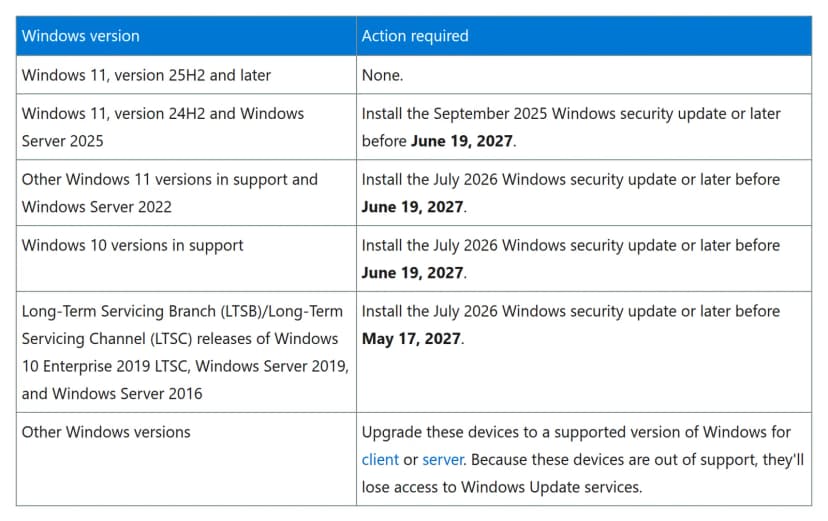
Install the July 2026 Windows security update or later before June 19, 2027.
Long-Term Servicing Branch (LTSB)/Long-Term Servicing Channel (LTSC) releases of Windows 10 Enterprise 2019 LTSC, Windows Server 2019, and Windows Server 2016
Install the July 2026 Windows security update or later before May 17, 2027.
Other Windows versions
Upgrade these devices to a supported version of Windows for client or server. Because these devices are out of support, they'll lose access to Windows Update services.
日本語にすると、次のとおりです。
版
やること
期限
Windows 11 25H2以降
不要
なし
Windows 11 24H2、Windows Server 2025
2025年9月のセキュリティ更新以降を入れる
2027年6月19日まで
上記以外のサポート中のWindows 11、Windows Server 2022
2026年7月のセキュリティ更新以降を入れる
2027年6月19日まで
サポート中のWindows 10
2026年7月のセキュリティ更新以降を入れる
2027年6月19日まで
Windows 10 Enterprise 2019 LTSC、Windows Server 2019、Windows Server 2016(LTSB・LTSC)
表には「Windows 10 versions in support」の行があります。ESU(拡張セキュリティ更新。サポート終了後も有料でセキュリティ更新を受け取れる契約)を契約している端末がこの行に入るかは、発表に書かれていません。ESUの契約状況と合わせた判断は、マイクロソフトの案内か販売元に確かめてください。ESUの期限と費用は、Windows 10法人ESUは10月13日で1年目終了 2年目を買うか移行かにまとめています。
Windows Server 2016と2019
Windows Server 2016はLTSB・LTSCの行にあり、期限は5月17日です。Server 2016のサポート終了は2027年1月12日で、移行の段取りはWindows Server 2016は1月12日終了 ファイルサーバー移行手順にあります。ESUで延ばす場合を含め、この証明書の対応との関係は発表に書かれていません。
WSUSとIntuneで違うこと
発表に書かれているのは、次の1点です。WSUS(Windows Server Update Services。社内のサーバーで更新を配る仕組み)から更新を受ける端末には、この件は当てはまりません。
Intune、Windows Update for Business、Configuration Managerなど、WSUS以外の管理ツールについて、発表は個別に書いていません。書かれているのは「普段の管理ツールで配ってよい」という範囲だけです。そのため、次のように整理しておくと迷いません。